
From photos to 3D: how our vision pipeline works
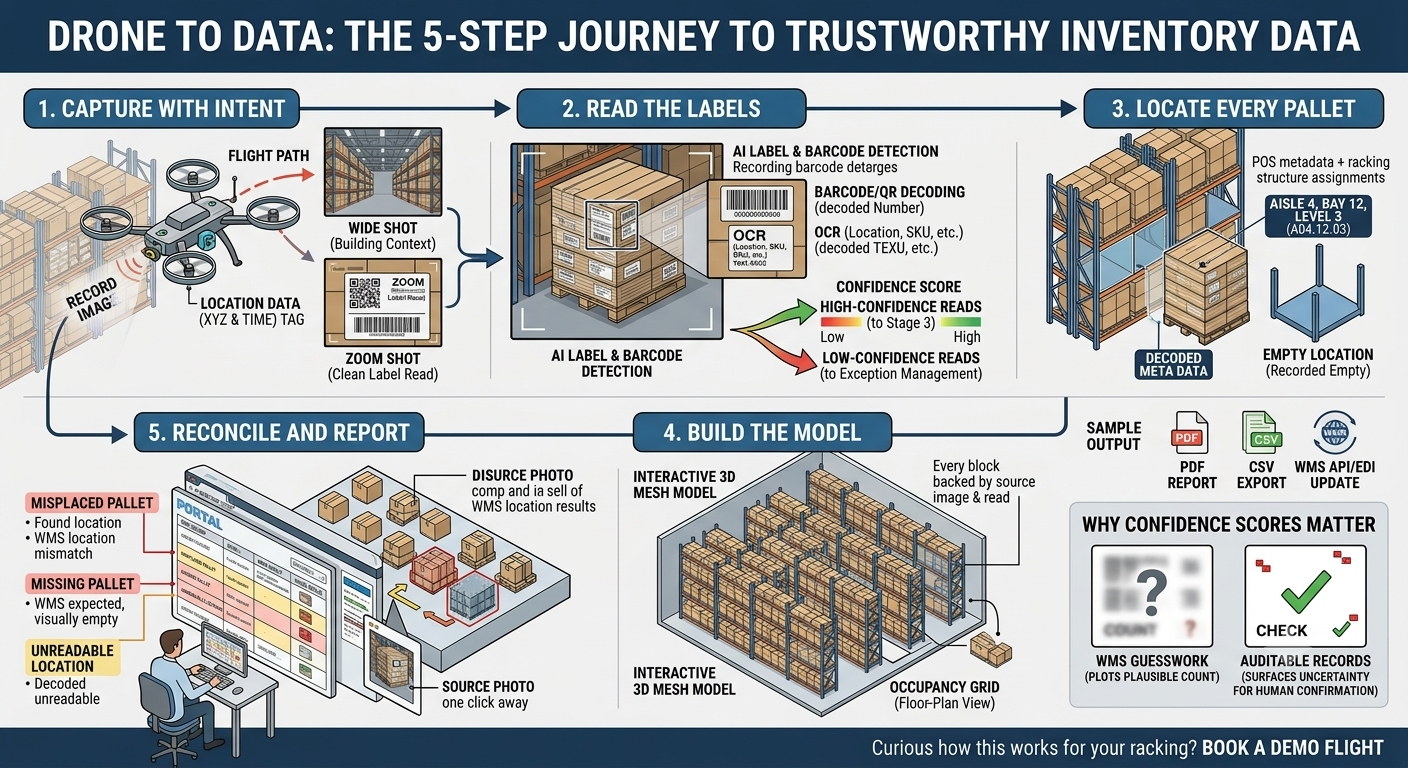
A drone flight produces thousands of images. On their own, those images are just pictures. The value is in turning them into structured, trustworthy inventory data: which pallet is where, what is on it, and how confident we are. Here is the journey from a raw frame to a number you can act on.
Step 1: Capture with intent
Good data starts at capture. Our flights record both wide shots, which establish where we are in the building, and zoomed shots, which get close enough to read a label cleanly. Every frame is tagged with where and when it was taken, so later steps can place it precisely within your layout.
The goal at this stage is coverage and legibility: see every location, and see each label well enough to read it.
Step 2: Read the labels
Once the imagery is in, the AI goes to work on the part humans find tedious: reading. The pipeline detects label and barcode regions in each frame, then decodes them:
- Barcodes and QR codes are decoded directly where they are sharp enough.
- Printed text (location codes, SKUs, human-readable labels) is read with OCR as a cross-check and a fallback when a barcode is damaged or obscured.
Each read carries a confidence score. High-confidence reads flow straight through; low-confidence ones are flagged rather than guessed.
Step 3: Locate every pallet
A decoded barcode is only half the answer. The other half is where it is. Using the position metadata from capture and the structure of your racking, the pipeline assigns each detected pallet to its exact rack location: aisle, bay and level.
The hard problem in warehouse vision is rarely “what is this?” It is “what is this, and exactly where is it, and how sure are we?”
This is also where occupancy comes from. Locations the drone saw clearly but found empty are recorded as empty, which is just as useful as knowing what is present.
Step 4: Build the model
With locations and contents resolved, we assemble the 3D warehouse mesh: an interactive model of your racks with stock shown in place. Switch to the floor-plan view and the same data becomes an occupancy grid you can read at a glance. Nothing here is decorative. Every block in the model is backed by a decoded read and a source image.
Step 5: Reconcile and report
Finally, the structured results are compared against your WMS records. The pipeline surfaces the exceptions that matter:
- Misplaced pallets: found, but not where the system expected
- Missing pallets: expected, but not seen
- Unreadable locations: seen, but the label could not be decoded confidently
You review all of it in the portal, with the source photo one click away from every number, then export to PDF/CSV or push results into your WMS via API or EDI.
Why the confidence scores matter
The most important design choice in the whole pipeline is that it never hides uncertainty. A count you cannot trust is worse than no count, so anything the system is unsure about is shown as an exception for a human to confirm, not quietly averaged away. That is what makes the output auditable rather than just plausible.
Curious how this would map onto your racking and label stock? Book a demo flight and we will show you the pipeline running on your own data.